2025. 10. 12. 14:00ㆍ도메인/Bluetooth
📚 이 포스팅은 iOS Conf SG 세션 중 Making Connections: Practical Core Bluetooth를 참고하였습니다.
OverView
- Bluetooth classic과 비교하여 BLE가 무엇인지 알아보고, BLE가 어떻게 통신하는지 알아보겠습니다.
- 위 통신 방식을 Core Bluetooth Framework가 어떻게 구현했는지 알아보겠습니다.
Bluetooth
- 25년 전에 릴리즈된 무선 통신 표준 프로토콜
- 현대 스마트폰의 대부분이 지원
- Bluetooth SIG(Special Interest Group)에 의해 관리되고 있음
- SIG가 표준 가이드를 제공하고 있는데 예를 들어 배터리 잔량 공유와 같은 device info 카테고리를 공유하는 방법을 공유
- 이런 가이드가 중요한 이유는 제조업체들이 공통으로 작동하기 때문에 프로토콜을 매번 새롭게 다시 만들 필요가 없음
Bluetooth Classic vs BLE(Bluetooth Low Energy)
| Bluetooth Classic | Bluetooth Low Energy |
|---|---|
| Basic Rate / 향상된 데이터 속도 | BLE Bluetooth Smart |
| 많은 에너지 소모 | 블루투스 4.0 |
| 높은 전송량(Higher throughput) | 간헐적 데이터 전송(Intermittent data) |
| 페어링 필수 | 페어링 선택 |
| 헤드셋, 키보드, 자동차, 게임 패드 등 | IoT, 센서, 웨어러블 블루투스 디바이스, 심장 박동기, 에어 태그 등 |
Bluetooth Classic은 더 많은 전송량과 더 빠른 전송 속도를 가지고 있기 때문에 음악 스트리밍이나 음성 통화처럼 지속적으로 많은 데이터를 주고 받는 경우에 더 적합함. BLE는 효율을 위해 속도가 떨어짐
Core Blutooth 프레임워크는 BLE만 사용할 수 있기 때문에 iOS 개발자로서는 BLE를 중점적으로 보면 된다. 하지만 iOS 및 대부분의 현대 기기는 클래식을 포함하여 둘 다 사용하고 있다. 예를 들어 에어팟의 경우 페어링관련은 BLE를 사용하지만 음악 스트리밍에는 Classic A2D2를 사용하고 있다. 일반적으로 Classic은 OS레벨에서 관리되고 있다.
주요 키워드
- Central: client로 연결을 시도하는 장치
- Peripheral: server로 client와 연결되는 장치
- GATT: Generic Attribute Profile. 연결에 사용되는 프로파일로 다음의 것들이 정의됨
- Service: 장치가 제공하는 기능의 논리적 그룹
- Characteristic: 특정 제공하는 기능 (read / write / notify)

서비스 모델은 UUID를 가지고 있고, Charateristic List를 가지고 있습니다. 각 Charateristic 모델도 UUID를 가지고 있고 notify인지 또는 read, write인지 정의합니다

센서가 페어링 모드에 들어가면 센서는 자신의 디바이스 정보(이름, 제조업체, 서비스 등)를 광고합니다. 아이폰이 페어링을 위해 탐색을 시작하면 광고하고 있는 센서를 확인합니다. 이 때 모든 장치를 탐색하지 않고, 미리 정의된 GATT만을 탐색할 수 있습니다.
아이폰이 해당 센서에게 연결 요청을 보내면, 센서가 연결을 채택합니다.
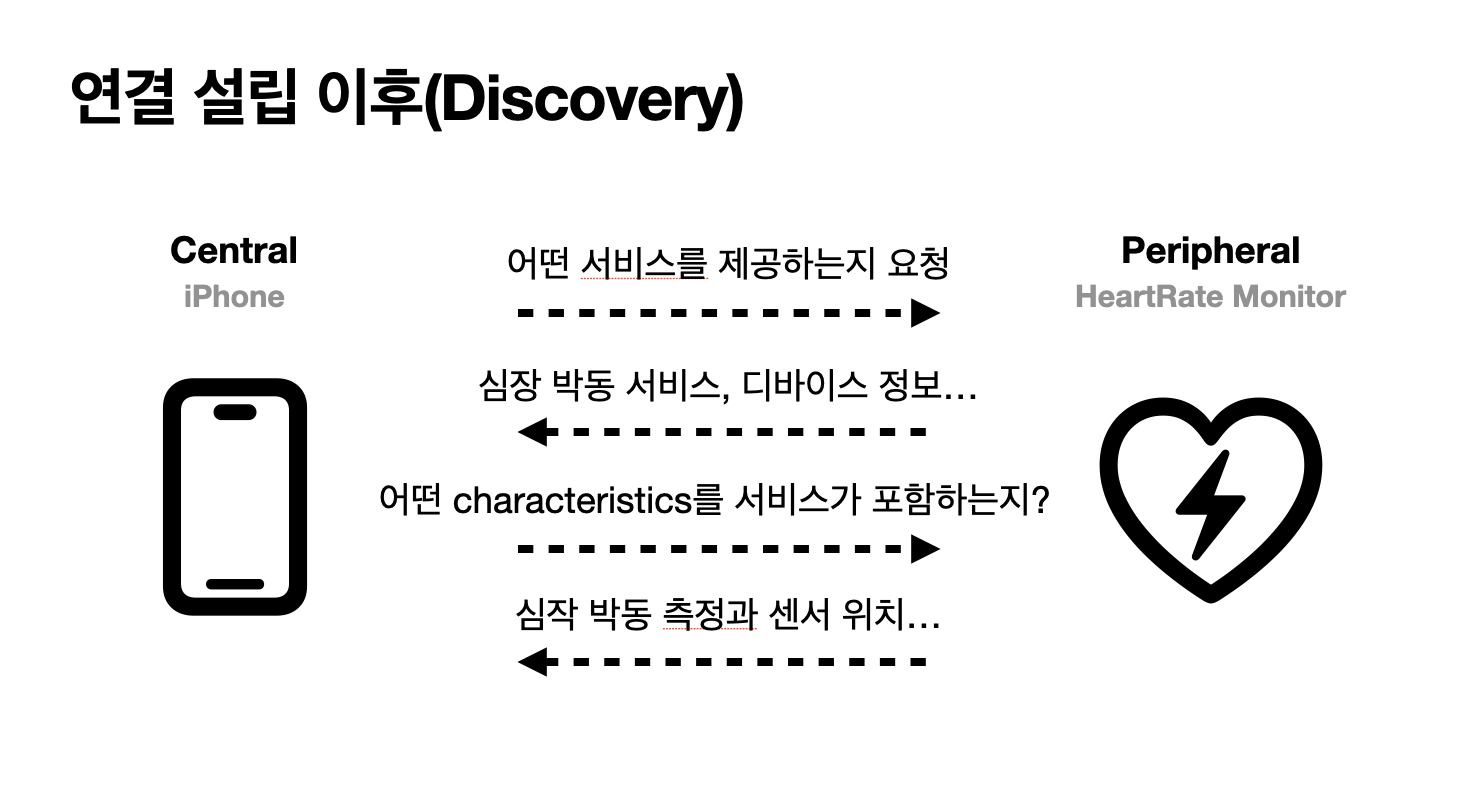
이 단계는 센서가 어떤 서비스와 Characteristic을 제공하는지 요청하는 단계이기 때문에 중요합니다.
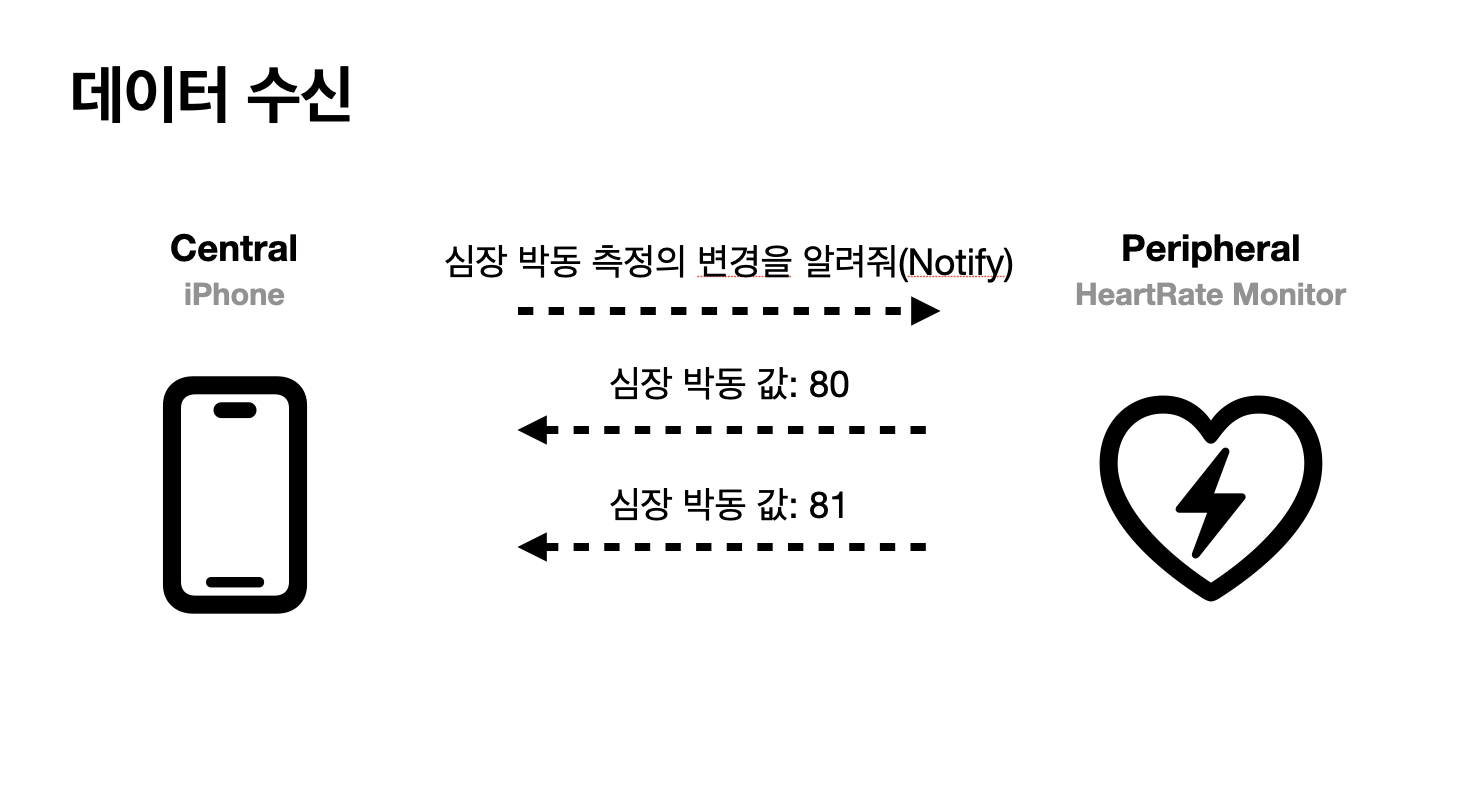
아이폰이 센서의 심장 박동 업데이트를 구독합니다. 이를 통해 데이터를 항상 수신하고 있는 것이 아니라, 특정 주기 단위로 데이터를 수신하여 에너지를 효율적으로 관리하면서도 실시간의 데이터를 받아올 수 있습니다.
Core Bluetooth
- 블루투스 디바이스와 통신하기 위한 애플 프레임워크
- 블루투스 상태와 권한을 제공
- 비동기 업데이트를 위해 Delegate pattern를 사용
- 앱은 장치 연결을 위한 책임을 짊
- Scan, Offer, Connecting, 데이터 교환
CBCentralManager
let cbCentralManager = CBCentralManager(delegate: self, queue: nil)- Peripherals와 연결하기 위한 시작점
- CBCentralManagerDelegate: 디바이스 상태와 연결 정보를 책임
- 특정 시리얼 큐를 설정하지 않으면 메인큐가 할당 됨
- 메서드를 인스턴스하면 블루투스 권한을 물어봄
Permissions
NSBluetoothAlwaysUsageDescription 권한 필요
백그라운드 모드를 지원한다면

Bluetooth States
func centralManagerDidUpdateState(_ central: CBCentralManager)

public enum CBManagerState : Int, @unchecked Sendable {

    case unknown = 0

    case resetting = 1

    case unsupported = 2

    case unauthorized = 3

    case poweredOff = 4

    case poweredOn = 5 // 중요
}
powerOn 이후 연결이 일어납니다.
GATT 구조
public enum Gatt {

    public enum Service {
        public static let heartRate = CBUUID(string: "180D")
    }

    public enum Characteristic {
        public static let heartRateMeasurement = CBUUID(string: "2A37")
    }
}
Discover
powerOn state 이후 peripherals를 스캐닝할 때, 다음과 같이 전체를 찾지 않고 특정 서비스만을 찾을 수 있습니다.
만약 특정 서비스 파라미터를 주지 않을 경우 모든 기기를 탐색합니다.
cbCentralManager.scanForPeripherals(withServices: [Gatt.Service.heartRate])

func centralManager(
    _ central: CBCentralManager,
    didDiscover peripheral: CBPeripheral,
    advertisementData: [String : Any],
    rssi RSSI: NSNumber
) {
    if !discoveredPeripherals.contains(peripheral) {
        discoveredPeripherals.append(peripheral)
    }
}
RSSIReceived signal strength indicator)로 수신의 강도를 나타냅니다.
Connecting
// Request

func connect(to peripheral: CBPeripheral) {
    connectedPeripheral = peripheral
    cbCentralManager.connect(peripheral)
    stopScanning()
}

// Delegate respond

func centralManager(
    _ central: CBCentralManager,
    didConnect peripheral: CBPeripheral
) {
    peripheral.delegate = self
    peripheral.discoverServices([Gatt.Service.heartRate])
}
수집한 Peripheral 중 하나를 선택하여 CentralManager를 통해 연결 요청합니다. CentralMangerDelegate를 통해 연결 응답받습니다. 이 때 얻은 peripheral의 정보를 수신하기 위하여 peripheralDelegate도 채택합니다.
Discovering Services
peripheral.discoverServices([...])를 통해 요청을 보내면
다음과 같이 Delegate에서 응답해줍니다.
func peripheral(
    _ peripheral: CBPeripheral,
    didDiscoverServices error: (any Error)?
) {
    guard
        error == nil,
        let services = peripheral.services,
        let heartRateService = services.first(where: { $0.uuid == Gatt.Service.heartRate })
    else {
        return
    }
    peripheral.discoverCharacteristics([Gatt.Characteristic.heartRateMeasurement], for: heartRateService)
}
비슷한 패턴으로 다음과 같이 서비스에서 특정 Characteristic을 얻을 수 있습니다.
func peripheral(
    _ peripheral: CBPeripheral,
    didDiscoverCharacteristicsFor service: CBService,
    error: (any Error)?
) {
    guard
        error == nil,
        let characteristics = service.characteristics,
        let heartRateMeasurement = characteristics.first(where: {
            $0.uuid == Gatt.Characteristic.heartRateMeasurement
        })
    else {
        return
    }
    peripheral.setNotifyValue(true, for: heartRateMeasurement)
}
Accessing Data
setNofiyValue를 통해 caracteristic을 구독할 수 있습니다.
func peripheral(_ peripheral: CBPeripheral, didUpdateValueFor characteristic: CBCharacteristic, error: (any Error)?) {
    guard
        error == nil,
        characteristic.uuid == Gatt.Characteristic.heartRateMeasurement,
        let payload = characteristic.value,
        let heartRateValue = decodeHeartRateValue(from: payload),
        heartRateValue != 0
    else {
        return
    }
    self.heartRate = heartRateValue
}

func decodeHeartRateValue(from payload: Data) -> Int? {
    guard payload.count >= 2 else {
        return nil
    }
    return Int(payload[1])
}
Central은 위의 peripheral delegate method를 통해 구독한 값을 수신할 수 있습니다. 값은 바이너리 데이터로 오며
디코딩 과정을 거쳐 앱에서 사용합니다.
여기서는 First byte는 payload 구조의 flag로 사용하였고, second byte는 심장 박동 BPM 값으로 사용하였습니다.
UUID 표준
위에서 사용된 UUID들은 SIG(Special Interest Group)에 의해 관리되고 있다. 표준 서비스와 통합을 목적으로 한다면 표준 UUID를 따르는게 좋다.
Heart Rate Service인 180D와 Heart Rate Measurement 2A37 모두 정의되어 있다. 16진수 4자리를 사용하고 실제로 이용할 때는 128비트를 이용한다.
예약된 목록은 여기서 볼 수 있다.
heart rate measurement의 값에서 first byte를 0인데 아래에서 0은 Heart Rate Value Format이다.
GATT에 사용된 표준 Charateristic에 대한 자세한 정보들은 여기서 볼 수 있다
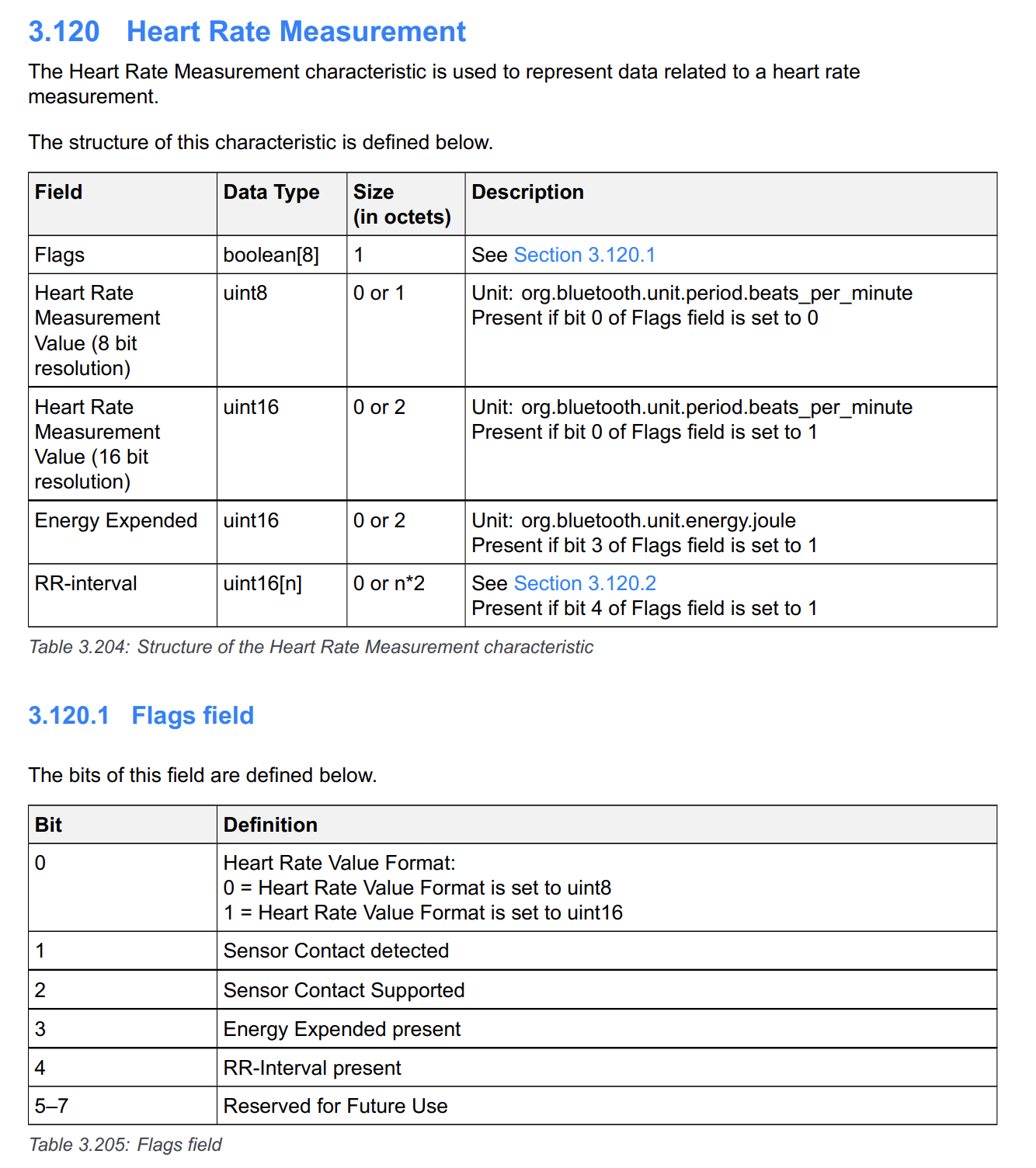
참조
'도메인 > Bluetooth' 카테고리의 다른 글
| [BLE] ⚡️ BLE Write와 State Restore (3) (0) | 2025.10.12 |
|---|---|
| [BLE] ⚡️ Peripheral 시뮬레이션 (2) (0) | 2025.10.12 |